You may imagine how many times you have seen a long video only to discover one useful thought, stopping, rewinding, and at the same time, you tried to note something. It’s slow and inefficient. The majority of the searchers of video to text transcription free do not intend to receive the text, they are trying to save time. Transcribing video to text free can transform video into something that you can scan, search and revisit in a few seconds using the right tools to do so. It is much easier to work with information using text, whether you are studying, creating something, or going through the meetings.
The first step is to get a transcript. Raw text by itself does not help the situation when it is not organized or difficult to read. The actual value is once you transcribe video to text free, once you manage it, summarize it, and make it useful either in the form of notes, subtitles, or even complete articles. Not only will you learn how to use video to text transcription free online tools, but you will also learn how to select the most appropriate one and convert video to text into a clear and useful output that can actually help you to work smarter and faster.
Part 1: Common Use Cases for Video to Text Transcription Free
To know when to apply video to text transcription free will guide you on the correct method to use and achieve better results. Various situations need various strategies and awareness of what you want will help you save time and energy.
Learning & Research
Video can be transcribed free from lectures, interviews, or podcasts, so it becomes easier to review the information. You do not need to watch the same video several times, and you can scan the transcript and mark important things and quickly locate quotes or references. It particularly comes in handy with students, researchers and anyone handling a lot of content. It can also be used to structure ideas and create structured notes using unstructured video content.
Content Creation
The reuse of content and converting video to text is one of the biggest advantages to creators and marketers. One video may be used as a blog post, email newsletter, or several posts on social networks. This does not only save time but also enhances SEO, as text is easier to index than video by the search engine. Video to text transcription free tools are the initial stage in scaling a content workflow of many creators.
Work & Productivity
AI video transcription has become common in business environments to transcribe meetings, calls, and discussions into recordings. As opposed to writing down notes by hand, the teams are able to concentrate on the conversation with the tool recording it all. Once you have been transcripted, you are able to take out action items, summarize major decisions, and give notes to your team. This enhances clarity, it minimizes misunderstandings and helps save time in the follow-ups.
Subtitles & Accessibility
With the help of an ai subtitle generator, you can add captions to videos in seconds on YouTube, TikTok or online courses. Subtitles enhance both accessibility to individuals with hearing impairment and also assist viewers to comprehend the information in noisy places. Moreover, captions enhance the video interaction and durability, particularly on short videos.
In any of the above cases, it is not merely to transcribe the video, but rather to make the content more usable, searchable, and easier to act upon.
Part 2: How to Choose the Best Video to Text Transcription Free Method
There is no single “best” way to do video to text transcription free. The right method depends on what you need, how fast you need it and how you plan to use the final output. Instead of focusing only on tools, it’s more effective to start with your goal and then choose the method that fits.
| Situation | Best Method | Why |
| Quick transcript | built-in captions | fastest |
| Accurate output | ai video transcription | better structure |
| No file | video to text transcription free link | paste URL |
| No login | video to text transcription free without login | instant use |
If your goal is speed, built-in captions or no-login tools are often enough. They allow you to transcribe video free quickly without setup, making them ideal for simple tasks or one-time use. However, these methods usually lack structure, editing options and export flexibility.
If you need higher quality output, such as organized text, speaker labels or summaries, then ai video transcription tools are a better choice. They are designed to convert video to text in a more usable format, which is especially helpful for content creation, research or professional use.
For situations where you don’t have access to the original file, using a video to text transcription free link method is the most efficient approach. Simply paste the URL and generate a transcript without downloading anything.
Key takeaway:
Always choose based on your end goal, speed, accuracy or usability, not just the tool itself.
Part 3: How to Get Video to Text Transcription Free (Step by Step)
If you want to do video to text transcription free effectively, it’s important to follow a clear workflow, not just random steps. The goal is not only to get text, but to turn video content into something structured, usable, and easy to work with.
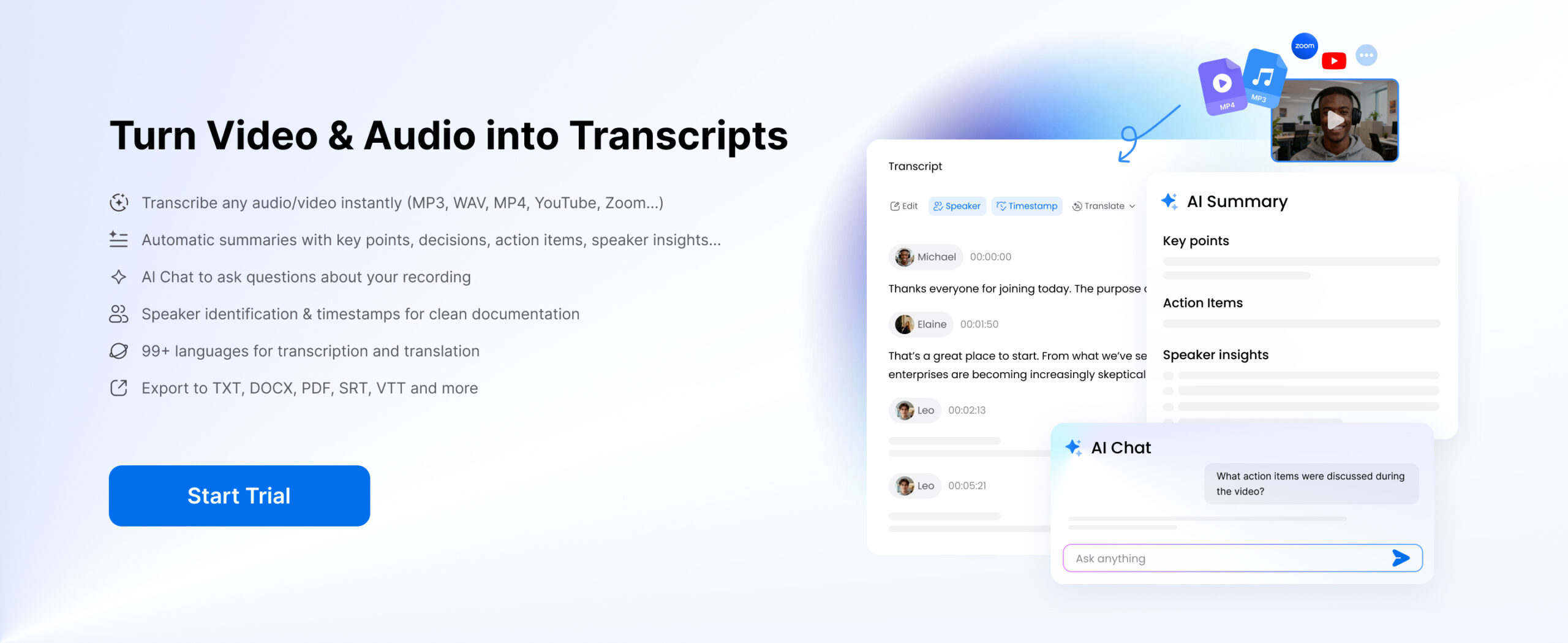
Clipto is designed for people who need more than a transcript. It helps turn video, audio, and link-based content into structured output that is easier to review, reuse, and share. For users working with lectures, meetings, interviews, podcasts or online videos, it offers a more practical workflow from transcription to summary, subtitles and content extraction.
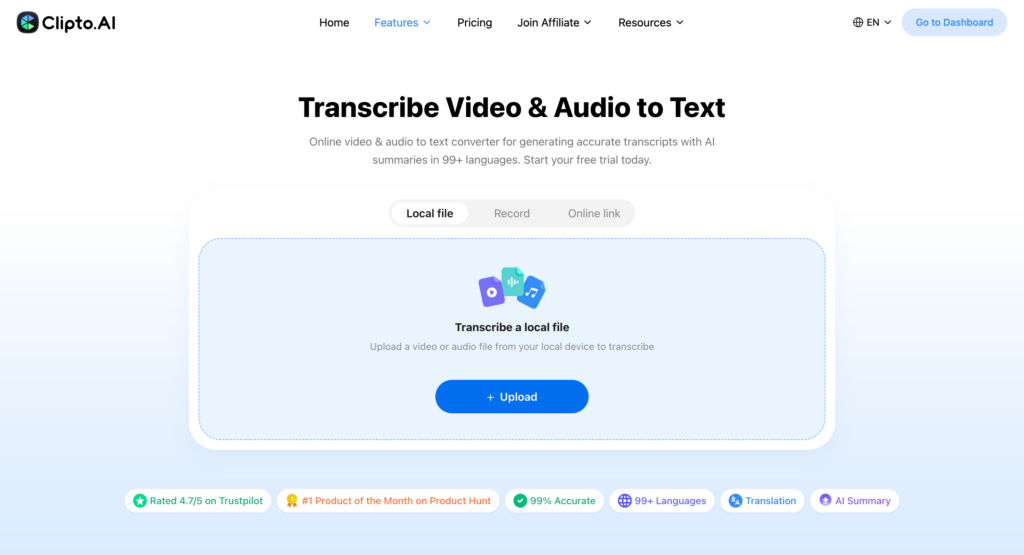
Step 1: Upload your video or paste a link to video transcription tool
Upload a video or audio file, or paste a video link from platforms like YouTube or TikTok to generate an accurate transcript using the Clipto Video Transcription tool.
Step 2: Generate video transcripts
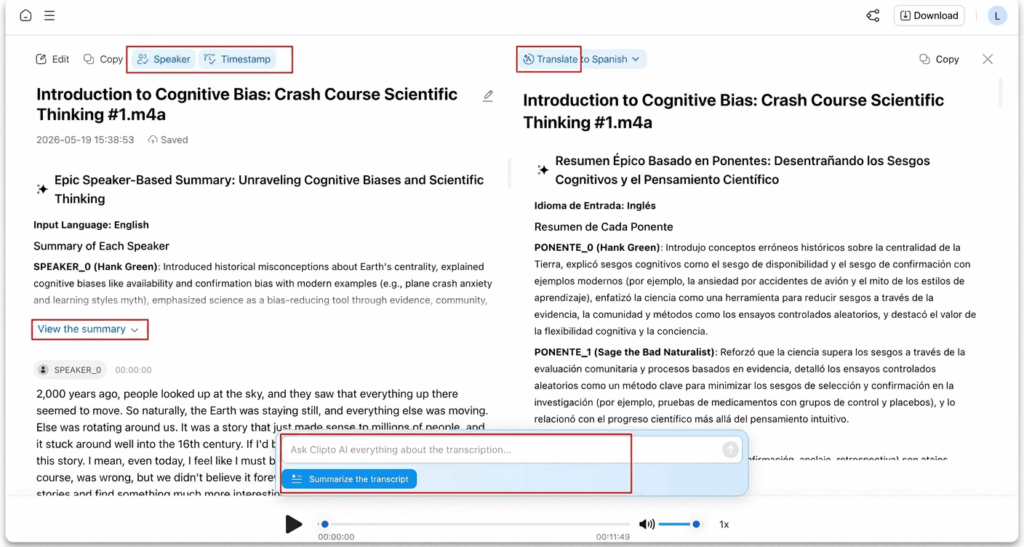
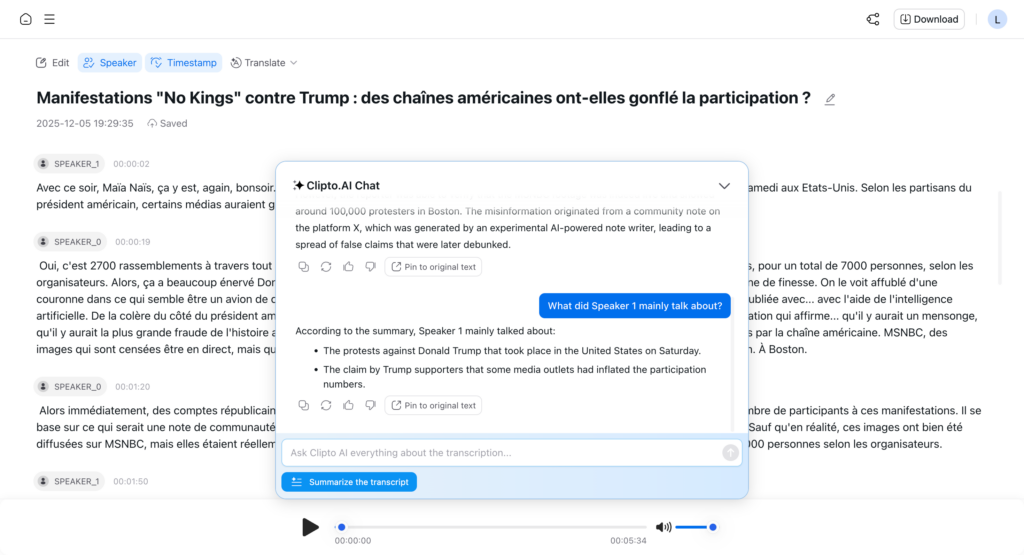
After uploading your video, the tool automatically generates an accurate transcript within seconds, complete with timestamps and speaker identification. If you need the content in another language, simply click the Translation feature to generate a translated transcript for easier understanding.
Step 3: Export or share your video transcripts
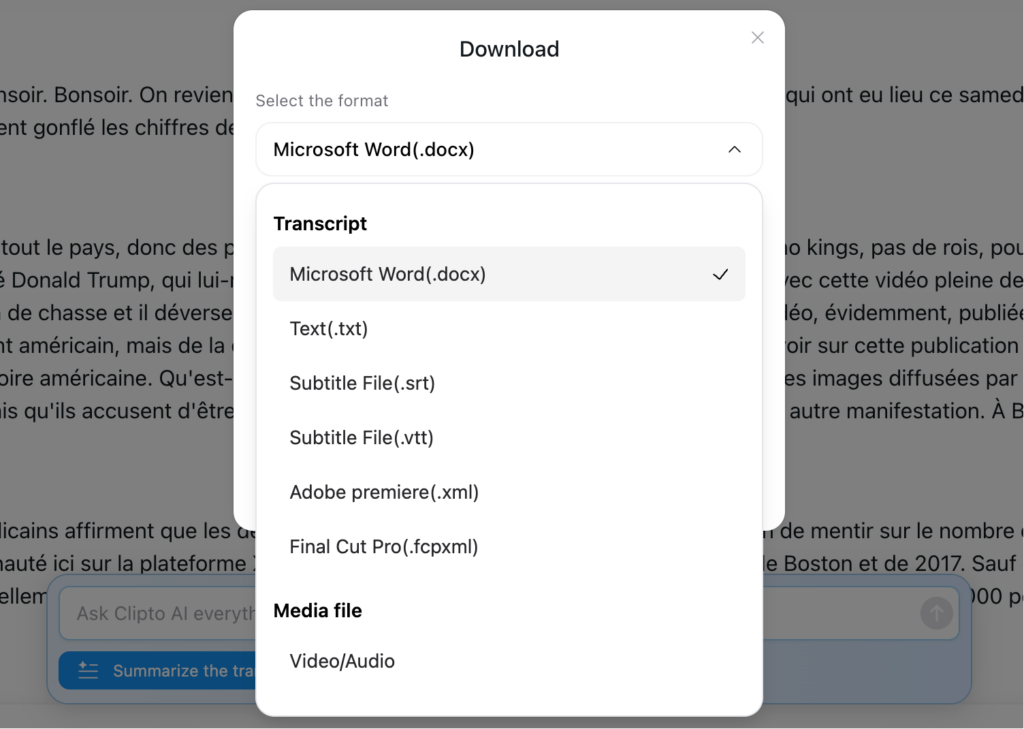
Export your transcript in multiple formats, including TXT and DOCX. You can also generate subtitles in SRT or VTT format, create AI-powered summaries, or turn the transcript into structured notes for easier review and content repurposing.
Note:
AI Summary helps you quickly create meeting notes, summaries and action items, while AI Chat allows you to ask questions, find specific details and explore the content more efficiently.
Why Clipto.AI Works Better for Real Use Cases
Clipto.AI is designed for real workflows, not just basic transcription.
- Long Video Support
Transcribe hours-long videos without strict limits - Multi-Language & Translation
Handle global content and different accents with ease - AI Summary & Content Extraction
Turn transcripts into clear summaries and key insights instantly - AI Chat with Transcript
Ask questions, extract highlights, and navigate content without rereading everything
Instead of just generating text, Clipto.AI helps you understand and use it.
Conclusion
The application of video to text transcription free is just the beginning. The actual benefit is realized in the way you apply the content later. As an illustrative case, you can go through a meeting transcript and extract the main decisions and provide a concise summary to your team instead of watching a 40-minutes long meeting again. An author can take a single video, convert video to text, and use it to create a blog post, captions or multiple social posts all out of the same video.
It is not a matter of the presence of text but its usefulness. When you use video to text transcription free, consider the way you can arrange, abbreviate or repurpose that information to save time and enhance readability. To have a smoother process, i.e., transcription to summaries and structured output, you may want to use such tools as Clipto.AI and convert any video material in everyday life into something useful and ready to use in minutes.
FAQs
1. What is the best way to do video to text transcription online, not having to download software?
You can rely on browser-based tools that assist in video to text transcription free online, and in this case, you post a file or have a video link pasted directly. Certain services such as Clipto.AI are entirely cloud-operated, which means you can transcribe video to text free and process data without any installations.
2. Can long videos (more than 1 hour) be converted into text?
There are a few tools that enable one to convert video to text on long files, but a significant number of other free tools have time restrictions. Applications that support longer durations are useful for full lectures, meetings, or podcasts without splitting files.
3. What is the comparison between AI video transcription and manual video transcription?
AI video transcription is much faster and can handle hours of videos in minutes. Although transcription with the manual approach can be more accurate, AI tools are much more efficient and useful in the majority of daily tasks.
4. Is it possible to use free AI to text transcription on multiple languages using video?
Of course, it is possible to use numerous modern tools that support multilingual video to text transcription free AI. This allows them to be used in international content, interviews, or videos with various accents.
5. What is the way to create subtitles with an AI subtitle generator?
An ai subtitle generator converts transcripts into subtitle formats such as SRT or VTT automatically. Others, such as Clipto.AI, have the ability to create subtitles based on video and improve workflow efficiency.
6. What is the distinction between videotaping audio and video to text?
Transcribing video to text free often implies making a word-for-word transcript. To convert video to text can also involve formatting, summarizing, or transforming the content into useful outputs such as notes or articles.