As 2026 draws to a close, Spotify Wrapped and other platforms’ annual recaps offer a fun way to look back at your habits, interests, and memorable moments throughout the year. But not every platform offers a year in review, and your year is about much more than what you listened to, watched, or browsed online. What if you want to create your own annual recap of your work achievements, learning experiences, personal growth, or favorite memories? In this guide, we’ll show you how to quickly and easily create your personal 2026 year in review or Wrapped, reflect on what mattered most, and prepare for a more meaningful 2027.
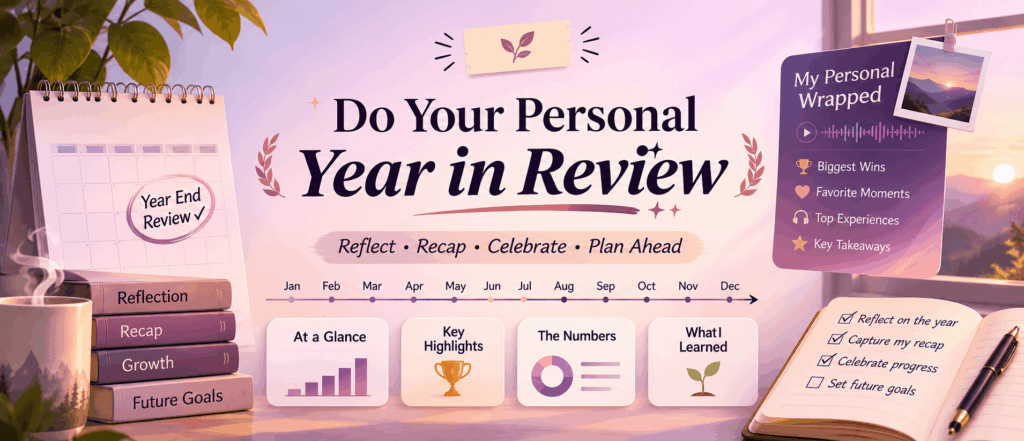
Part 1. What Is a Year in Review and Why Is It Important?
A year in review, also known as an annual recap or year-end review, is a way to look back on the past 12 months and reflect on your experiences, achievements, challenges, and personal growth. Whether it takes the form of a written summary, a visual timeline, a video, or a personalized Wrapped, it helps you capture the moments that shaped your year.

Beyond simply revisiting memories, creating a personal year in review offers several benefits:
- Celebrate your achievements: Recognize your accomplishments, milestones, and progress, no matter how big or small.
- Understand your habits and patterns: Discover how you spent your time, what you focused on, and how your interests and priorities changed throughout the year.
- Learn from your experiences: Reflect on challenges, mistakes, and lessons learned to identify areas for improvement.
- Preserve meaningful memories: Bring together important moments, experiences, and ideas that might otherwise be forgotten.
- Set clearer goals for the coming year: Use insights from your 2026 year in review to make more informed decisions and set meaningful goals for 2027.
A personal year in review is not just about summarizing what happened in 2026. It’s also an opportunity to better understand yourself, recognize how far you’ve come, and decide where you want to go next.
Part 2. How to Do a Personal 2026 Year in Review
Creating your own annual year-in-review recap can be more challenging than you might expect, especially when you have a year’s worth of videos, audio recordings, meeting notes, documents and other personal records to go through.
While AI tools like ChatGPT and Claude can help you summarize content, their file upload and context limits can make it difficult to process large collections of multimedia files in a single conversation. Manually uploading, transcribing and summarizing each file can also be time-consuming.
This is where Clipto comes in. With Clipto’s desktop app for Mac and Windows, you can connect your local multimedia library to AI assistants like ChatGPT and Claude. Instead of manually uploading files one by one, you can enable your AI assistant to access, search and analyze your multimedia content through Clipto, making it easier to create a comprehensive and personalized 2026 year in review based on your actual records.
Here’s how to quickly and easily create your own annual recap or Wrapped.
Step 1. Gather Your Records from 2026
Collect the materials that reflect your year, such as:
- Meeting recordings and work-related videos
- Personal voice notes and audio recordings
- Travel videos and daily vlogs
- Online courses and learning materials
- Interviews, presentations and project recordings
- Personal journals, notes and text documents
You don’t need to organize or summarize everything manually before getting started.
Step 2. Connect Your Multimedia Files to Your AI Assistant
As mentioned earlier, most AI tools have limitations when it comes to uploading and processing large volumes of files, especially video and audio recordings. To overcome this challenge, you’ll need an additional tool like Clipto to help manage your multimedia files and make them accessible to AI assistants.
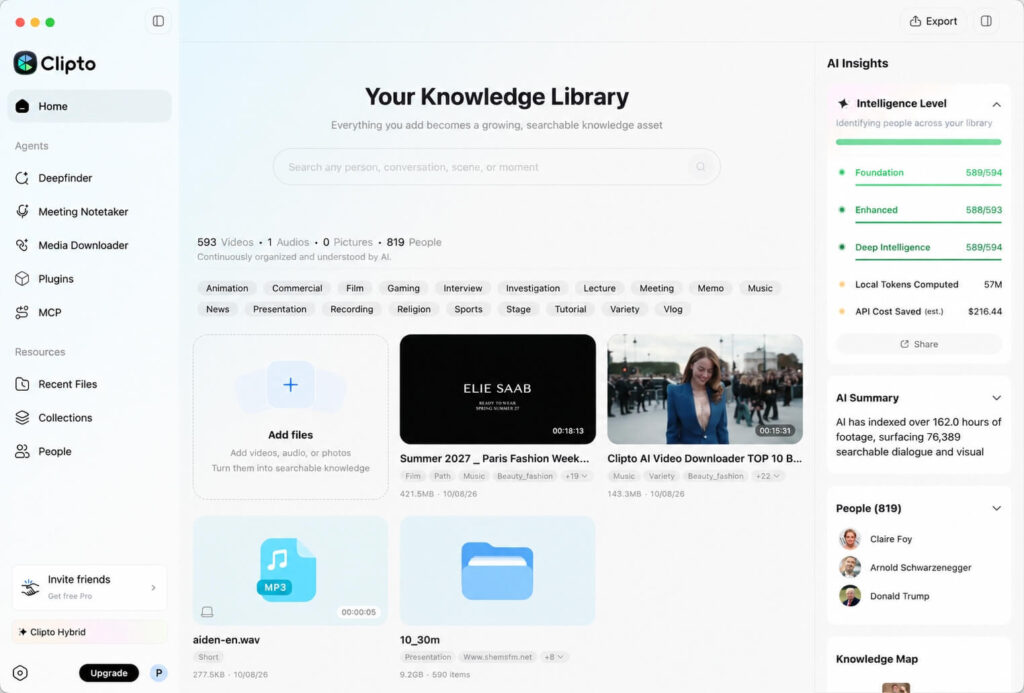
Download and install Clipto on your Mac or Windows computer. Add your video, audio, and supported text files to Clipto so that your annual records can be accessed from one place.
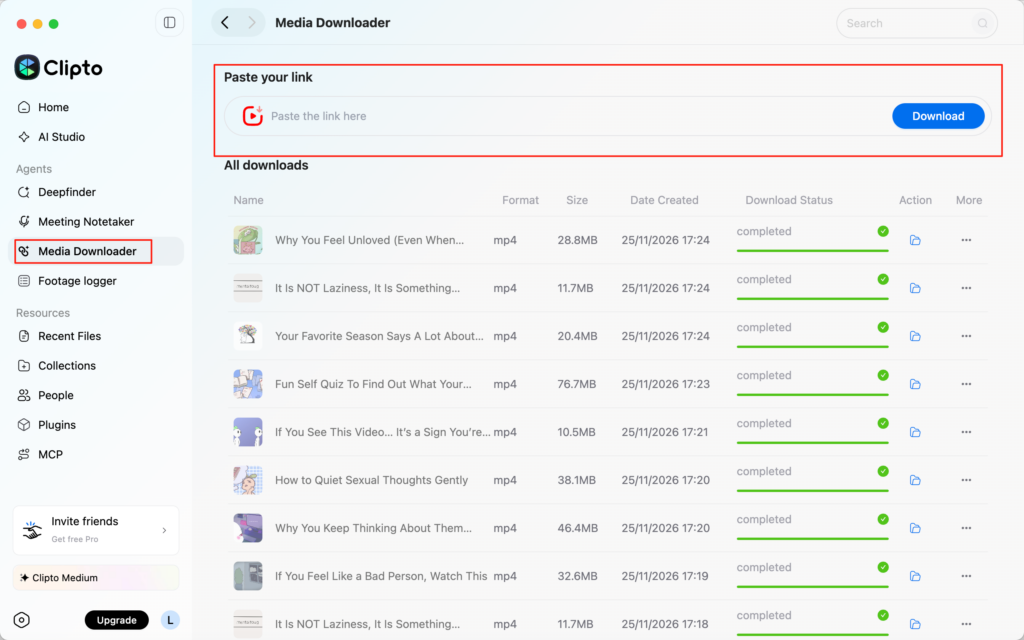
If you need to download videos or audio recordings from YouTube, podcast platforms, or other online sources for your year in review, simply click Media Downloader in the left sidebar to batch download the media files you need.
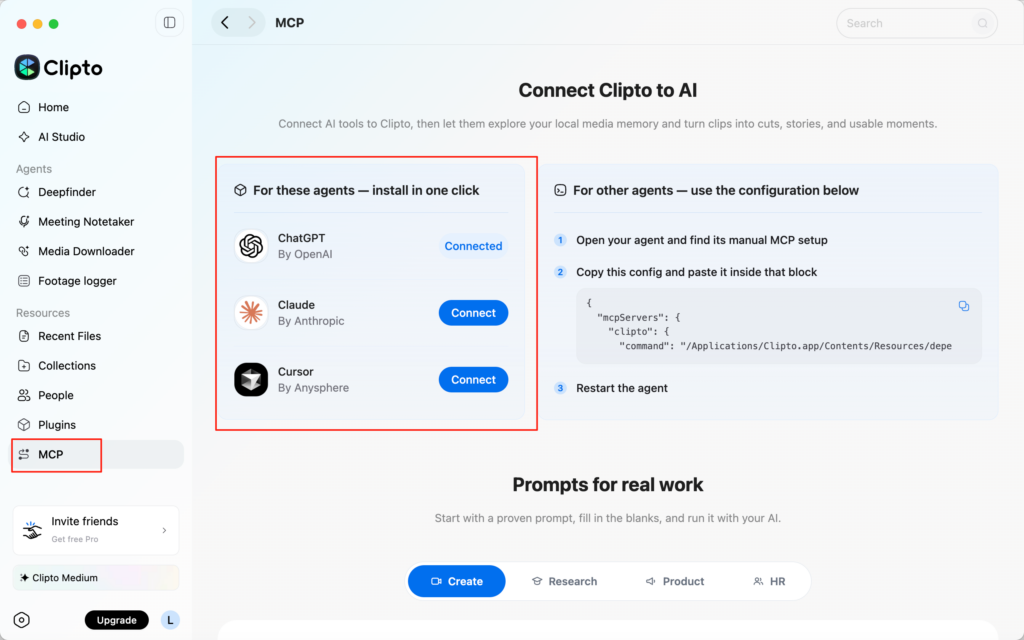
Click MCP in the left sidebar of Clipto, then click Connect next to your preferred AI assistant, such as ChatGPT or Claude. Once connected, your AI assistant can access and analyze your multimedia library through Clipto.
Step 3. Generate Your Personalized 2026 Year in Review
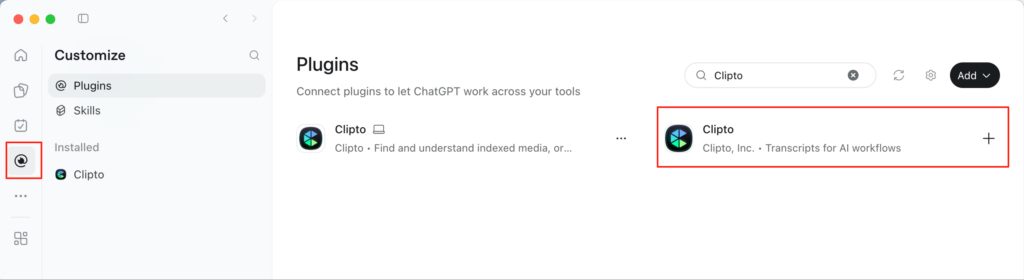
Once connected, open your AI assistant, such as ChatGPT, go to Plugins, search for Clipto, and install the Clipto plugin.
Then type @ in the chat box and select Clipto.
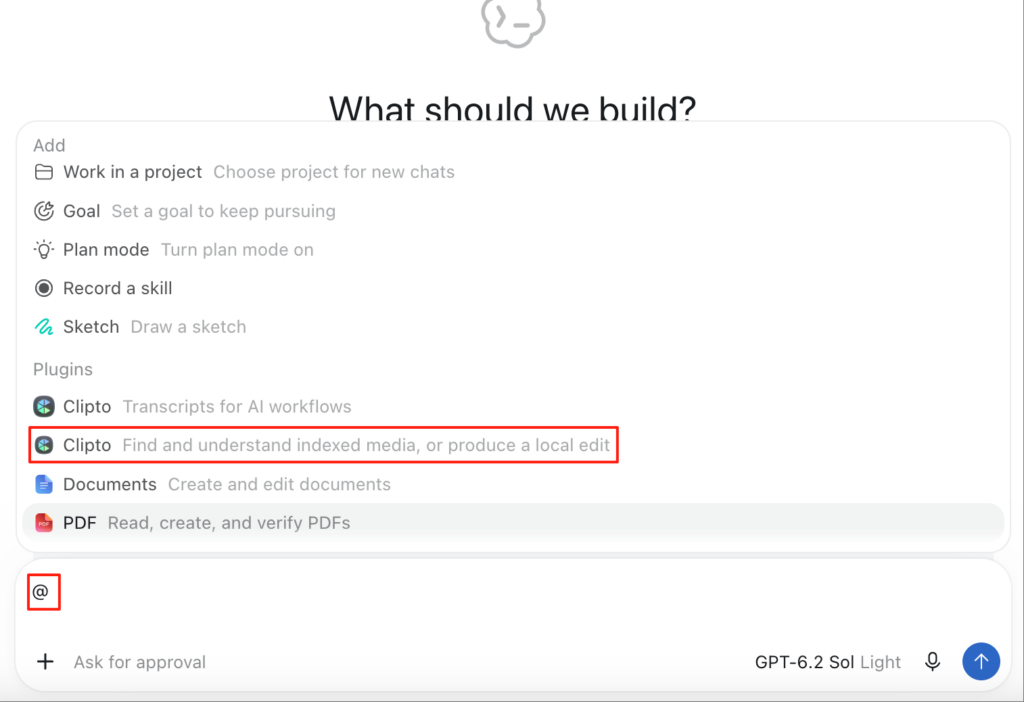
Enter your prompt asking the AI to analyze your 2026 multimedia files in Clipto and generate a personalized year in review based on your records.

Depending on what you want to reflect on, here are some prompts you can try:
- Review my 2026 records in Clipto and identify my biggest achievements, challenges, and milestones.
- Based on my files in Clipto, summarize what I learned throughout 2026 and identify the skills I developed.
- Create a monthly timeline of my most important experiences in 2026 using my records in Clipto.
- Analyze recurring themes, interests, habits, and patterns across my 2026 multimedia files in Clipto.
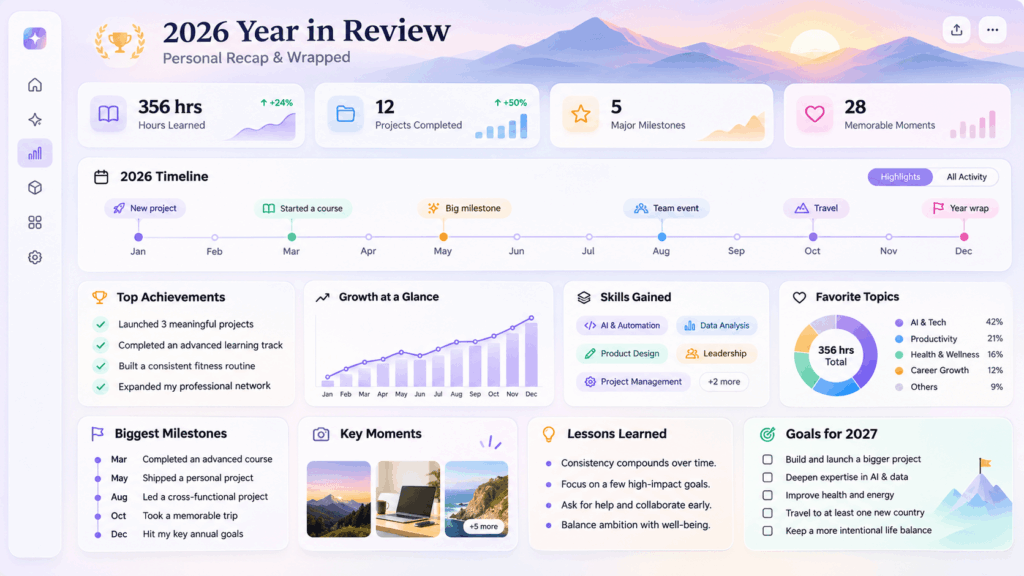
- Create my personal 2026 Wrapped based on my records in Clipto, highlighting key moments, achievements, lessons learned, and memorable experiences.
- Analyze my 2026 records in Clipto and suggest meaningful goals and priorities for 2027.
Note:
If you want to make your annual recap or Wrapped more visual and engaging, you can ask your AI assistant to present your annual insights using timelines, charts, tables, diagrams, and other visual elements.
Here are some visual year in review prompts you can try:
- Create a visual 2026 year in review based on my records in Clipto, including timelines, charts, and key highlights.
- Generate a Spotify-style 2026 Wrapped based on my multimedia library in Clipto, featuring personalized statistics, memorable moments, and engaging visuals.
- Create an infographic summarizing my achievements, challenges, and personal growth in 2026 based on my files in Clipto.
- Turn my 2026 records in Clipto into an interactive year in review dashboard with charts, statistics, timelines, and key insights.
- Create a year in review based on my records in Clipto. Present the results as an interactive visual report rather than a plain-text summary. Use creative layouts, visually distinct cards, charts, diagrams, timelines, icons, and highlights where appropriate. Choose a cohesive color palette, elegant typography and a design style that matches the content. Make it easy to explore and understand at a glance.
Conclusion
Creating a personal 2026 year in review is a meaningful way to revisit your memories, celebrate your achievements, reflect on your growth, and set new goals for 2027. You don’t have to rely on platform-generated annual recaps or spend hours manually reviewing your records.
With Clipto, you can connect your multimedia library to AI assistants like ChatGPT and Claude, making it easier to turn a year’s worth of videos, audio recordings, and text files into meaningful insights. Whether you prefer a written annual recap, a visual year in review, or a Spotify-style Wrapped, you can create a personalized summary that reflects your own experiences.
FAQ
1. What does Wrapped mean?
Popularized by Spotify Wrapped, Wrapped refers to a personalized annual recap highlighting your activities, habits, interests, achievements, and memorable moments, often presented in a visually engaging format.
2. When does Spotify Wrapped 2026 come out?
Spotify Wrapped typically comes out in late November or early December. The exact release date for Spotify Wrapped 2026 has yet to be confirmed.
3. How to get your YouTube Recap 2026?
Once available, open the YouTube app, go to the You tab, and tap the Recap banner. Alternatively, visit youtube.com/recap to access your personalized annual recap.
4. What is the difference between a year in review, a recap and a Wrapped?
A year in review offers a comprehensive reflection on the past year, while a recap provides a brief summary of key highlights. Wrapped typically refers to a personalized, data-driven, and visually engaging annual recap.
5. How can I create my own 2026 Wrapped with AI?
Import your video, audio, and supported text files into Clipto, connect it to ChatGPT or Claude, and ask your AI assistant to generate a personalized 2026 Wrapped with key insights, timelines, charts, and other visuals based on your records.